Mods & Plugins Management
Automatically download and manage mods and plugins for your Minecraft servers.
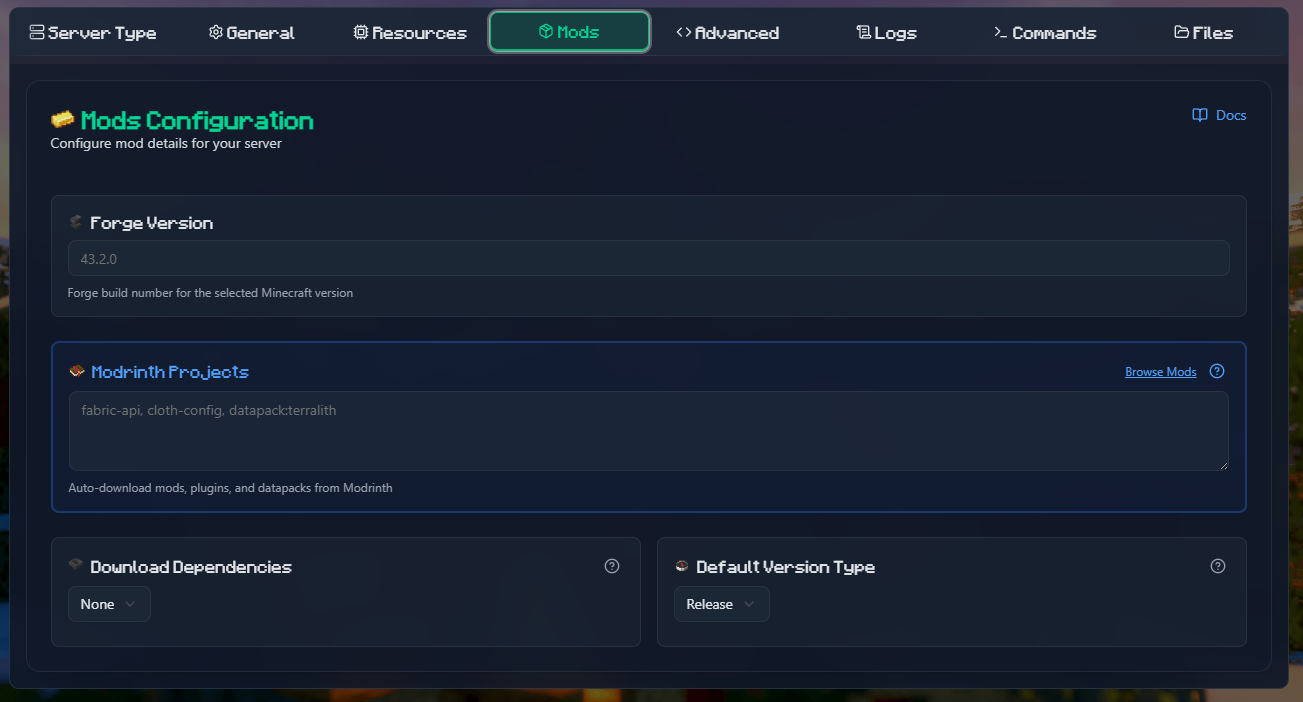
Modrinth
Automatically download and manage mods, plugins, and datapacks from Modrinth.
Supported Server Types
- ✅ Fabric
- ✅ Forge
- ✅ CurseForge (AUTO_CURSEFORGE)
Configuration
| Option | Variable | Description | Default |
|---|---|---|---|
| Projects | MODRINTH_PROJECTS | List of mods/plugins to install | - |
| Dependencies | MODRINTH_DOWNLOAD_DEPENDENCIES | Download dependencies: none, required, optional | none |
| Version Type | MODRINTH_PROJECTS_DEFAULT_VERSION_TYPE | Preferred version: release, beta, alpha | release |
| Loader | MODRINTH_LOADER | Force specific loader type | Auto-detected |
Project Reference Formats
The MODRINTH_PROJECTS variable accepts multiple formats (comma or newline separated):
Basic formats:
- Project slug (simplest):
fabric-api - With version ID:
fabric-api:bQZpGIz0 - With version number:
fabric-api:0.119.2+1.21.4 - With release type:
fabric-api:beta - With prefix (loader override):
fabric:fabric-api - Datapacks:
datapack:terralithordatapack:terralith:2.5.5 - Using project ID:
P7dR8mSH - From file:
@/path/to/modrinth-mods.txt
Examples
Fabric server with common mods:
environment:
  TYPE: FABRIC
  VERSION: 1.21.4
  MODRINTH_PROJECTS: |
    fabric-api
    cloth-config
    sodium
    lithium
MODRINTH_DOWNLOAD_DEPENDENCIES: requiredForge server with specific versions:
environment:
  TYPE: FORGE
  VERSION: 1.20.1
  MODRINTH_PROJECTS: |
    jei:10.2.1.1005
    geckolib
createMixed mods with datapacks:
environment:
  TYPE: FABRIC
  MODRINTH_PROJECTS: |
    fabric-api
    datapack:terralith:2.5.5
datapack:incendiumUsing a listing file:
Create /path/to/mods.txt:
# Performance mods
fabric-api
sodium
lithium

# QoL mods
cloth-config
modmenuThen reference it:
volumes:
  - ./mods-list:/extras:ro
environment:
MODRINTH_PROJECTS: "@/extras/mods.txt"Auto-Removal
Mods removed from MODRINTH_PROJECTS will be automatically deleted from the server. Set to empty string to remove all mods.
CurseForge Files
Download specific mods/plugins from CurseForge for any server type that supports mods.
API Key Required
You need a CurseForge API key to use this feature. Get one from CurseForge for Studios.
Configuration
| Option | Variable | Description |
|---|---|---|
| API Key | CF_API_KEY | Your CurseForge API key (required) |
| Files | CURSEFORGE_FILES | List of project-file references |
Project-File Reference Formats
The CURSEFORGE_FILES variable accepts these formats (comma or space separated):
- Project page URL:
https://www.curseforge.com/minecraft/mc-mods/jei - File page URL:
https://www.curseforge.com/minecraft/mc-mods/jei/files/4593548 - Project slug:
jei - Project ID:
238222 - Slug/ID with file ID:
jei:4593548or238222:4593548 - Slug/ID with partial filename:
jei@10.2.1.1005 - From listing file:
@/path/to/cf-mods.txt
Examples
Basic mod list:
environment:
  CF_API_KEY: $2a$10$Iao...
  CURSEFORGE_FILES: |
    jei
    geckolib
aquacultureSpecific versions:
environment:
  CURSEFORGE_FILES: |
    jei:4593548
    geckolib@4.2.1
238222:4593548Mixed formats:
environment:
  CURSEFORGE_FILES: |
    https://www.curseforge.com/minecraft/mc-mods/jei
    geckolib:4.2.1
aquacultureUsing listing file:
Create cf-mods.txt:
# Core mods
jei:4593548
geckolib

# Extra mods
aquaculture
naturalistMount and reference:
volumes:
  - ./cf-list:/extras:ro
environment:
CURSEFORGE_FILES: "@/extras/cf-mods.txt"Auto-Selection
If you don't specify a file version, the newest compatible file for your Minecraft version and server type will be selected automatically.
Dependencies
CurseForge Files can detect missing dependencies but cannot resolve them automatically. Make sure to include all required dependencies in your list.
Combining Modrinth and CurseForge
You can use both Modrinth and CurseForge Files together:
environment:
  TYPE: FABRIC
  VERSION: 1.21.4

  # Modrinth mods (preferred for performance)
  MODRINTH_PROJECTS: |
    fabric-api
    sodium
    lithium
  MODRINTH_DOWNLOAD_DEPENDENCIES: required

  # CurseForge exclusive mods
  CF_API_KEY: your_key
  CURSEFORGE_FILES: |
    some-cf-exclusive-mod
another-cf-modVersion Compatibility
Always ensure mods from both sources are compatible with your Minecraft version and loader type.
Plugin Management (Spigot/Paper/etc)
For plugin-based servers (Spigot, Paper, Bukkit, etc.), you can use Spiget:
environment:
  TYPE: PAPER
  VERSION: 1.21.4
  SPIGET_RESOURCES: |
    9089
    28140
34315Where the numbers are Spigot resource IDs from SpigotMC.
Best Practices
- Use Modrinth when possible - Generally faster and more reliable
- Specify versions for production servers to avoid unexpected updates
- Test in development before applying to production
- Keep API keys secure - Use environment variables, never commit them
- Use listing files for easier management of large mod lists
- Document your mods - Add comments in listing files to explain what each mod does
Troubleshooting
Mods not downloading
- Check API key is correct
- Verify project slugs/IDs are correct
- Check server logs for specific errors
- Ensure network connectivity
Version conflicts
- Make sure all mods are compatible with your Minecraft version
- Check mod loader compatibility (Fabric vs Forge)
- Review dependency requirements
Missing dependencies
- For Modrinth: Set
MODRINTH_DOWNLOAD_DEPENDENCIES: required - For CurseForge: Manually add dependencies to your list
Next Steps
- Learn about Server Types
- See all Configuration Options